


背景#
目前,火山方舟SDK V3在易用性、功能丰富性、稳定性、性能等各方面远超V1/V2,且已经上线并稳定运行一段时间。火山方舟平台SDK V1/V2 版本将于2024年11月30日正式下线,不再支持调用,2024年11月19日以后创建的推理接入点将不能使用SDK V1/V2访问。建议用户尽快核实SDK版本,并于旧版本下线前参照本迁移指引完成SDK V1/V2至SDK V3版本切换和业务迁移。
V3版本增强说明#
- 易用性:V3接口完全兼容 OpenAI 协议,支持直接使用社区兼容 OpenAI 协议的 SDK 调用,同时更容易和 LangChain 等开源生态结合。
- 功能更丰富:V3接口对 function calling、n-sample等功能的支持更完善。
- 稳定性:V3接口模型推理服务链路优化,整体稳定性更好;推理服务的模型版本切换支持平滑切换(无中断)。
- 性能:V3接口模型推理服务平均 TTFT (用户提交查询后开始看到模型输出的速度)降低 50-100ms。
火山方舟SDK版本判断方式#
- 如果您使用的是火山方舟官方提供的 SDK,可以通过 import 路径判断:出现
ark字样的为 V3 API,出现maas字样的为 V1/V2 API。各语言import路径如下所示:
| 语言 | V1/V2 | V3 |
|---|---|---|
| Python | import volcengine.maas |
from volcenginesdkarkruntime import Ark |
| Go | import "github.com/volcengine/volc-sdk-golang/service/maas" |
import "github.com/volcengine/volcengine-go-sdk/service/arkruntime" |
| Java | import com.volcengine.service.maas.MaasService |
import com.volcengine.ark.runtime.service.ArkService |
- 如果您使用的是自行实现的 HTTP 接口,可以通过域名或 path 前缀判断。各语言域名及path前缀如下所示:
| V1 | V2 | V3 | |
|---|---|---|---|
| 域名 | maas-api.ml-platform-cn-beijing.volces.com | maas-api.ml-platform-cn-beijing.volces.com | ark.cn-beijing.volces.com |
| path前缀 | /api/v1 |
/api/v2 |
/api/v3 |
迁移指引#
接口参数映射#
新旧API URL对应表及详细接口参数映射说明如下:
| 旧版API URL | 新版API URL |
|---|---|
| api/v1/chat | api/v3/chat/completions |
| api/v2/endpoint/endpoint_id/chat | api/v3/chat/completions |
| api/v2/endpoint/endpoint_id/embeddings | api/v3/embeddings |
| api/v2/endpoint/endpoint_id/tokenization | api/v3/tokenization |
| /api/v2/endpoint/endpoint_id/classification | 暂不支持 |
| /api/v2/endpoint/endpoint_id/images/quick-gen | 暂不支持 |
| /api/v2/endpoint/endpoint_id/images/flex-gen | 暂不支持 |
| /api/v2/endpoint/endpoint_id/audio/speech | 暂不支持 |
api/v1/chat -> api/v3/chat/completions 参数映射#
请求参数#
| api/v1/chat | api/v3/chat/completions | 备注 |
|---|---|---|
| req_id | 通过 http header 支持 | v3 支持 client request id,便于 client 侧日志和 server 侧日志串联,可以通过 X-Client-Request-Id http header 指定。该方式可以区分方舟服务侧和客户侧的请求 id,请求方可以多个请求传入相同的 X-Client-Request-Id,便于串联请求。 |
| model.endpoint_id | model | v3 仅支持通过 endpoint id 访问模型,因此去掉了 v1 的 model.name 和 model.version。 |
| messages | messages | 如果使用 function calling ,需要根据 Function Calling 使用说明 对请求中的 function_call 字段做相应修改。 v3 的 function calling 功能支持更多模型(v1/v2 不支持 doubao-functioncall 系列模型),和更多能力(v1/v2 不支持 tool_choice等功能)。 |
| stream | stream | v3 的 流式返回不会默认在最后一个 chunk 返回 usage 信息,如果需要返回,可以指定 stream_options.include_usage 开关,如果为 true,在响应最后返回一个额外的块,此块上的 usage 字段代表整个请求的 token 用量,这一块的choices 字段为空数组。所有其他块也将包含 usage 字段,但值为 null。 |
| functions | tools | 如果使用 function calling ,需要根据 Function Calling 使用说明 对请求中的 function_call 字段做相应修改。 v3 的 function calling 功能支持更多模型(v1/v2 不支持 doubao-functioncall 系列模型),和更多能力(v1/v2 不支持 tool_choice等功能)。 |
| plugins | - | v3 无对标参数。 v1 的联网插件功能可以通过方舟智能体的 联网内容插件功能说明实现,智能体的 trace/开放性 都更优。 |
| crypto_token | - | v3 无对标参数。 |
| parameters.max_new_tokens | max_tokens | v3 允许范围为 [0, 4096]。 |
| parameters.min_new_tokens | - | v3 无对标参数,该参数不建议使用。 |
| parameters.max_prompt_tokens | - | v3 无对标参数,该参数不建议使用。 用户如果有 prompt 截断的需求,建议 结合 分词接口(tokenization) 在业务侧自行处理截断逻辑,方舟服务端内置的截断逻辑可能会导致截断不符合客户预期。 |
| parameters.temperature | temperature | v3 允许范围为 [0, 1]。 |
| do_sample | - | v3 无对标参数,该参数不建议使用。 同时,在 v1/v2 API 上,该参数均不生效。 |
| parameters.top_p | top_p | - |
| parameters.top_k | - | v3 无对标参数。 v1 接口 top_k 设置为 1 时采样策略实际上为贪心采样,v3 要达到相同效果可以设置 temperature=0。如果有 top_k 设置为其它值的需求,可以通过 提交工单 咨询。 |
| parameters.frequency_penalty | frequency_penalty | v3 允许范围为 [-2, 2]。 |
| parameters.presence_penalty | presence_penalty | v3 允许范围为 [-2, 2]。 |
| parameters.repetition_penalty | - | 无对标参数。 传入该字段不生效。 |
| stop | stop | v3 最多允许输入 4 个字符串。 |
| parameters.logprobs | logprobs top_logprobs |
v1 parameters.logprobs=value 的接口行为,可以通过 v3 的 logprobs=true, top_logprobs=value 实现。 |
| parameters.guidance | 通过 http header 支持 | 如有定制需求可以通过 提交工单 咨询。 |
| parameters.logit_bias | logit_bias | - |
响应参数#
非流式调用#
| api/v1/chat | api/v3/chat/completions | 备注 |
|---|---|---|
| req_id | id | v3 接口 response 返回的 id 是服务端生成的,请求唯一的 id。用户可以通过 client request id 或 request id 提交 badcase。 |
| choice | choices | v3 接口返回的 choices 是一个列表,当未指定 n 参数时,choices[0] 等同于 v1 的 choice。 |
| usage | usage | - |
| extra | - | v3 无对标参数。 |
流式调用#
| api/v1/chat | api/v3/chat/completions | 备注 |
|---|---|---|
| req_id | id | v3 接口 response 返回的 id 是服务端生成的,请求唯一的 id。用户可以通过 client request id 或 request id 提交 badcase。 |
| choice | choices | v3 接口返回的 choices 是一个列表。 v3 兼容 openai 的接口协议,流式场景下,返回的 choices[0].delta 等同于 v1 的 choice.message。 |
| usage | usage | - |
| extra | - | v3 无对标参数。 |
api/v2/endpoint/:endpoint_id/chat -> api/v3/chat/completions 参数映射#
请求参数#
| api/v2/endpoint/:endpoint_id/chat | api/v3/chat/completions | 备注 |
|---|---|---|
| :endpoint_id | model | v2 在 url path 中,v3 在 body 中通过 model 字段传递。 |
| messages | messages | - |
| stream | stream | v3 的 流式返回不会默认在最后一个 chunk 返回 usage 信息,如果需要返回,可以指定 stream_options.include_usage 开关,如果为 true,在响应最后返回一个额外的块,此块上的 usage 字段代表整个请求的 token 用量,这一块的choices 字段为空数组。所有其他块也将包含 usage 字段,但值为 null。 |
| tools | tools | v3 的 function calling 功能支持更多模型(v1/v2 不支持 doubao-functioncall 系列模型),和更多能力(v1/v2 不支持 tool_choice等功能)。 |
| user | user | - |
| crypto_token | - | v3 无对标参数。 |
| parameters.max_new_tokens | max_tokens | v3 允许范围为 [0, 4096]。 |
| parameters.min_new_tokens | - | v3 无对标参数,该参数不建议使用。 |
| parameters.max_prompt_tokens | - | v3 无对标参数,该参数不建议使用。 用户如果有 prompt 截断的需求,建议 结合 分词接口(tokenization) 在业务侧自行处理截断逻辑,方舟服务端内置的截断逻辑可能会导致截断不符合客户预期。 |
| parameters.temperature | temperature | v3 允许范围为 [0, 1]。 |
| do_sample | - | v3 无对标参数,该参数不建议使用,实际上在 v1/v2 API 上,该参数也是不生效的。 |
| parameters.top_p | top_p | - |
| parameters.top_k | - | v3 无对标参数。 v1 接口 top_k 设置为 1 时采样策略实际上为贪心采样,v3 要达到相同效果可以设置 temperature=0。如果有 top_k 设置为其它值的需求,可以 case by case 讨论下。 |
| parameters.frequency_penalty | frequency_penalty | v3 允许范围为 [-2, 2]。 |
| parameters.presence_penalty | presence_penalty | v3 允许范围为 [-2, 2]。 |
| parameters.repetition_penalty | repetition_penalty | v3 允许范围为 [0, 2]。 |
| stop | stop | v3 最多允许输入 4 个字符串。 |
| parameters.logprobs | logprobs top_logprobs |
v2 parameters.logprobs=value 的接口行为,可以通过 v3 的 logprobs=true, top_logprobs=value 实现。 |
| parameters.guidance | 通过 http header 支持 | 如有定制需求可以通过 提交工单 咨询。 |
| parameters.logit_bias | logit_bias | - |
响应参数#
非流式调用#
| api/v2/endpoint/:endpoint_id/chat | api/v3/chat/completions | 备注 |
|---|---|---|
| choices | choices | - |
| usage | usage | - |
| extra | - | v3 无对标参数。 |
流式调用#
| api/v2/endpoint/:endpoint_id/chat | api/v3/chat/completions | 备注 |
|---|---|---|
| choices | choices | v3 兼容 openai 的接口协议,流式场景下,返回的 choices[0].delta 等同于 v1 的 choice.message。 |
| usage | usage | - |
| extra | - | v3 无对标参数。 |
api/v2/endpoint/:endpoint_id/embeddings -> api/v3/embeddings 参数映射#
请求参数#
| api/v2/endpoint/:endpoint_id/embeddings | api/v3/embeddings | 备注 |
|---|---|---|
| :endpoint_id | model | v2 在 url path 中,v3 在 body 中通过 model 字段传递。 |
| input | input | - |
| encoding_format | encoding_format | v3 支持 encoding_format 取值为 float 或 base64。 |
| user | user | - |
响应参数#
| api/v2/endpoint/:endpoint_id/embeddings | api/v3/embeddings | 备注 |
|---|---|---|
| object | object | - |
| data | data | - |
| usage | usage | - |
api/v2/endpoint/:endpoint_id/tokenization -> api/v3/tokenization 参数映射#
请求参数#
| api/v2/endpoint/:endpoint_id/tokenization | api/v3/tokenization | 备注 |
|---|---|---|
| :endpoint_id | model | v2 在 url path 中,v3 在 body 中通过 model 字段传递。 |
| text | text | v3 的 text 可以输入一个字符串,或者一个字符串列表。 |
响应参数#
| api/v2/endpoint/:endpoint_id/tokenization | api/v3/tokenization | 备注 |
|---|---|---|
| tokens | - | 该字段会带来一些性能问题,并且用户可以通过 offset_mapping 和输入的文本串来计算该字段,因此 v3 不支持返回 tokens。 |
| token_ids | data[0].token_ids | v3 的 text 输入字符串时,返回的 data 字段长度固定为 1,此时 data[0].token_ids 相当于 v2 接口的 token_ids。 |
| offset_mapping | data[0].offset_mapping | v3 的 text 输入字符串时,返回的 data 字段长度固定为 1,此时 data[0].offset_mapping 相当于 v2 接口的 offset_mapping。 |
| total_tokens | data[0].total_tokens | v3 的 text 输入字符串时,返回的 data 字段长度固定为 1,此时 data[0].total_tokens 相当于 v2 接口的 total_tokens。 |
SDK 迁移#
Python#
v1/v2 支持 python 3.5+,v3 需要 python 3.7+,3.7 以下的版本如需使用方舟 API 建议参考 ChatCompletions-文字对话 实现 HTTP 调用,或使用兼容 openai-like 协议的第三方 SDK。
v1 和 v3 对比#
# v1 [deprecated]
# python -m pip install --user volcengine
import os
from volcengine.maas import MaasService, MaasException, ChatRole
maas = MaasService('https://maas-api.ml-platform-cn-beijing.volces.com', 'cn-beijing')
maas.set_ak(os.getenv("VOLC_ACCESSKEY"))
maas.set_sk(os.getenv("VOLC_SECRETKEY"))
resp = maas.chat({
"model": {
"name": "skylark-pro",
},
"messages": [
{"role": ChatRole.USER, "content": "hello"}
]
})
print(resp)
# v3 [recommended]
# python -m pip install --upgrade arkruntime
import os
from arkruntime import Ark
client = Ark(
api_key=os.environ.get("ARK_API_KEY"), # 这里同时支持通过 api_key 构造和通过 aksk 构造,二者选其一即可
base_url="https://ark.cn-beijing.volces.com/api/v3",
)
completion = client.chat.completions.create(
model="doubao-seed-2-1-pro-260915", # Replace with Model ID
messages = [
{"role": "user", "content": "hello"},
],
)
print(completion)
v2 和 v3 对比#
# v2 [deprecated]
# python -m pip install --user volcengine
import os
from volcengine.maas.v2 import MaasService
from volcengine.maas import MaasException, ChatRole
maas = MaasService('https://maas-api.ml-platform-cn-beijing.volces.com', 'cn-beijing')
maas.set_ak(os.getenv("VOLC_ACCESSKEY"))
maas.set_sk(os.getenv("VOLC_SECRETKEY"))
resp = maas.chat("ep-xxxxxx-yyy", {
"messages": [
{"role": ChatRole.USER, "content": "hello"}
]
})
print(resp)
# v3 [recommended]
# python -m pip install --upgrade arkruntime
import os
from arkruntime import Ark
client = Ark(
api_key=os.environ.get("ARK_API_KEY"), # 这里同时支持通过 api_key 构造和通过 aksk 构造,二者选其一即可
base_url="https://ark.cn-beijing.volces.com/api/v3",
)
completion = client.chat.completions.create(
model="doubao-seed-2-1-pro-260915", # Replace with Model ID
messages = [
{"role": "user", "content": "hello"},
],
)
print(completion)
Golang#
v3 需要 1.18 及以上的 golang 版本,1.18 以下的 golang 版本如需使用方舟 API 建议参考 ChatCompletions-文字对话 实现 HTTP 调用,或使用兼容 openai-like 协议的第三方 SDK。
v1 和 v3 对比#
// v1 [deprecated]
// go get -u github.com/volcengine/volc-sdk-golang
import (
"fmt"
"os"
"github.com/volcengine/volc-sdk-golang/service/maas"
"github.com/volcengine/volc-sdk-golang/service/maas/models/api"
)
func main() {
r := maas.NewInstance("https://maas-api.ml-platform-cn-beijing.volces.com", "cn-beijing")
r.SetAccessKey(os.Getenv("VOLC_ACCESSKEY"))
r.SetSecretKey(os.Getenv("VOLC_SECRETKEY"))
got, status, err := r.Chat(&api.ChatReq{
Model: &api.Model{
Name: "skylark-pro",
},
Messages: []*api.Message{
{
Role: maas.ChatRoleOfUser,
Content: "hello",
},
},
})
if err != nil {
panic(err)
}
fmt.Println(got)
}
// v0.2.0
// go get github.com/volcengine/ark-runtime-go@v0.2.0
package main
import (
"context"
"fmt"
"os"
"github.com/volcengine/ark-runtime-go/arkruntime"
"github.com/volcengine/ark-runtime-go/arkruntime/model/chat"
)
func main() {
client := arkruntime.NewClientWithApiKey(
os.Getenv("ARK_API_KEY"),
arkruntime.WithBaseUrl("https://ark.cn-beijing.volces.com/api/v3"),
)
resp, err := client.CreateChatCompletion(context.Background(), &chat.ChatCompletionRequest{
Model: "doubao-seed-2-1-pro-260915",
Messages: []chat.ChatCompletionRequestMessage{
userMessage("hello"),
},
})
if err != nil {
panic(err)
}
fmt.Println(resp)
}
func userMessage(content string) chat.ChatCompletionRequestMessage {
return chat.ChatCompletionRequestMessage{
OneOf: chat.NewChatCompletionRequestUserMessageChatCompletionRequestMessageSum(
chat.ChatCompletionRequestUserMessage{
Role: chat.ChatCompletionRequestUserMessageRoleUser,
Content: chat.NewOptNilChatCompletionMessageContent(chat.NewStringChatCompletionMessageContent(content)),
},
),
}
}
v2 和 v3 对比#
// v2 [deprecated]
// go get -u github.com/volcengine/volc-sdk-golang
import (
"fmt"
"os"
api "github.com/volcengine/volc-sdk-golang/service/maas/models/api/v2"
client "github.com/volcengine/volc-sdk-golang/service/maas/v2"
)
func main() {
r := client.NewInstance("https://maas-api.ml-platform-cn-beijing.volces.com", "cn-beijing")
r.SetAccessKey(os.Getenv("VOLC_ACCESSKEY"))
r.SetSecretKey(os.Getenv("VOLC_SECRETKEY"))
got, status, err := r.Chat("ep-xxxxxx-yyy", &api.ChatReq{
Messages: []*api.Message{
{
Role: api.ChatRoleUser,
Content: "hello",
},
},
})
if err != nil {
panic(err)
}
fmt.Println(got)
}
// v0.2.0
// go get github.com/volcengine/ark-runtime-go@v0.2.0
package main
import (
"context"
"fmt"
"os"
"github.com/volcengine/ark-runtime-go/arkruntime"
"github.com/volcengine/ark-runtime-go/arkruntime/model/chat"
)
func main() {
client := arkruntime.NewClientWithApiKey(
os.Getenv("ARK_API_KEY"),
arkruntime.WithBaseUrl("https://ark.cn-beijing.volces.com/api/v3"),
)
resp, err := client.CreateChatCompletion(context.Background(), &chat.ChatCompletionRequest{
Model: "doubao-seed-2-1-pro-260915",
Messages: []chat.ChatCompletionRequestMessage{
userMessage("hello"),
},
})
if err != nil {
panic(err)
}
fmt.Println(resp)
}
func userMessage(content string) chat.ChatCompletionRequestMessage {
return chat.ChatCompletionRequestMessage{
OneOf: chat.NewChatCompletionRequestUserMessageChatCompletionRequestMessageSum(
chat.ChatCompletionRequestUserMessage{
Role: chat.ChatCompletionRequestUserMessageRoleUser,
Content: chat.NewOptNilChatCompletionMessageContent(chat.NewStringChatCompletionMessageContent(content)),
},
),
}
}
Java#
v1 和 v3 对比#
/*
v1 [deprecated]
# pom.xml
<dependency>
<groupId>com.volcengine</groupId>
<artifactId>volc-sdk-java</artifactId>
<version>LATEST</version>
</dependency>
*/
import com.volcengine.helper.Const;
import com.volcengine.model.maas.api.Api;
import com.volcengine.service.maas.MaasException;
import com.volcengine.service.maas.MaasService;
import com.volcengine.service.maas.impl.MaasServiceImpl;
public class ChatDemo {
public static void main(String[] args) {
MaasService maasService = new MaasServiceImpl("https://maas-api.ml-platform-cn-beijing.volces.com", "cn-beijing");
maasService.setAccessKey(System.getenv("VOLC_ACCESSKEY"));
maasService.setSecretKey(System.getenv("VOLC_SECRETKEY"));
Api.ChatReq req = Api.ChatReq.newBuilder()
.setModel(Api.Model.newBuilder().setName("skylark-pro"))
.addMessages(Api.Message.newBuilder().setRole(Const.MaasChatRoleOfUser).setContent("hello"))
.build();
Api.ChatResp resp = maasService.chat(req);
System.out.println(resp);
}
}
/*
v3 [recommended]
# pom.xml
<dependency>
<groupId>com.volcengine</groupId>
<artifactId>ark-runtime</artifactId>
<version>${ark-runtime.version}</version>
</dependency>
*/
import com.volcengine.ark.runtime.service.ArkService;
import com.volcengine.ark.runtime.models.chat.*;
import com.volcengine.ark.runtime.service.ArkService;
import java.util.ArrayList;
import java.util.List;
public class ChatCompletionsExample {
public static void main(String[] args) {
// 这里同时支持通过 api_key 构造和通过 aksk 构造,二者选其一即可
String apiKey = System.getenv("ARK_API_KEY");
ArkService service = ArkService.builder()
.apiKey(apiKey)
.baseUrl("https://ark.cn-beijing.volces.com/api/v3")
.build();
final List<ChatCompletionRequestMessage> messages = new ArrayList<>();
final ChatCompletionRequestMessage message = ChatCompletionRequestUserMessage.builder().role(ChatCompletionRequestMessageType.USER).content(ChatCompletionMessageContent.ofString("hello")).build();
messages.add(message);
ChatCompletionRequest chatCompletionRequest = ChatCompletionRequest.builder()
.model("ep-xxxxxx-yyy")
.messages(messages)
.build();
service.createChatCompletion(chatCompletionRequest).getChoices().forEach(choice -> System.out.println(choice.getMessage().getContent()));
// shutdown service before process exited.
service.shutdownExecutor();
}
}
v2 和 v3 对比#
/*
v2 [deprecated]
# pom.xml
<dependency>
<groupId>com.volcengine</groupId>
<artifactId>volc-sdk-java</artifactId>
<version>LATEST</version>
</dependency>
*/
import com.volcengine.model.maas.api.v2.*;
import com.volcengine.service.maas.MaasException;
import com.volcengine.service.maas.v2.MaasService;
import com.volcengine.service.maas.v2.impl.MaasServiceImpl;
import java.util.ArrayList;
import java.util.Arrays;
import java.util.stream.Stream;
public class ChatV2Demo {
public static void main(String[] args) {
MaasService maasService = new MaasServiceImpl("https://maas-api.ml-platform-cn-beijing.volces.com", "cn-beijing");
maasService.setAccessKey(System.getenv("VOLC_ACCESSKEY"));
maasService.setSecretKey(System.getenv("VOLC_SECRETKEY"));
ChatReq req = new ChatReq()
.withMessages(new ArrayList<>(Arrays.asList(
new Message().withRole(Message.ChatRole.USER).withContent("hello")
)));
ChatResp resp = maasService.chat("ep-xxxxxx-yyy", req);
System.out.println(resp);
}
}
/*
v3 [recommended]
# pom.xml
<dependency>
<groupId>com.volcengine</groupId>
<artifactId>ark-runtime</artifactId>
<version>${ark-runtime.version}</version>
</dependency>
*/
import com.volcengine.ark.runtime.service.ArkService;
import com.volcengine.ark.runtime.models.chat.*;
import com.volcengine.ark.runtime.service.ArkService;
import java.util.ArrayList;
import java.util.List;
public class ChatCompletionsExample {
public static void main(String[] args) {
// 这里同时支持通过 api_key 构造和通过 aksk 构造,二者选其一即可
String apiKey = System.getenv("ARK_API_KEY");
ArkService service = ArkService.builder()
.apiKey(apiKey)
.baseUrl("https://ark.cn-beijing.volces.com/api/v3")
.build();
final List<ChatCompletionRequestMessage> messages = new ArrayList<>();
final ChatCompletionRequestMessage message = ChatCompletionRequestUserMessage.builder().role(ChatCompletionRequestMessageType.USER).content(ChatCompletionMessageContent.ofString("hello")).build();
messages.add(message);
ChatCompletionRequest chatCompletionRequest = ChatCompletionRequest.builder()
.model("ep-xxxxxx-yyy")
.messages(messages)
.build();
service.createChatCompletion(chatCompletionRequest).getChoices().forEach(choice -> System.out.println(choice.getMessage().getContent()));
// shutdown service before process exited.
service.shutdownExecutor();
}
}
多语言社区SDK及 Langchain 调用指南#
- 火山方舟大模型/智能体调用 v3 API 与 OpenAI API 协议兼容,您可以使用兼容 OpenAI API 协议的多语言社区 SDK 调用火山方舟大模型/智能体 API。详细说明可参考 多语言社区 SDK。
- 目前SDK v3支持通过 Langchain 接入方舟 API,由于方舟 V3 接口兼容 Openai 的接口协议,您可以通过 ChatOpenAI 使用,详细说明可参考 多语言社区 SDK。
联网插件切换#
主要以 Python 为例,其余语言类似请参考:
chat v1
import os
from volcengine.maas import MaasService, MaasException, ChatRole
maas = MaasService('https://maas-api.ml-platform-cn-beijing.volces.com', 'cn-beijing')
maas.set_ak(os.getenv("VOLC_ACCESSKEY"))
maas.set_sk(os.getenv("VOLC_SECRETKEY"))
resp = maas.chat({
"model": {
"name": "skylark-pro",
},
"messages": [
{"role": ChatRole.USER, "content": "hello"}
],
"plugins": ["browsing"],
})
print(resp)
bot chat v3
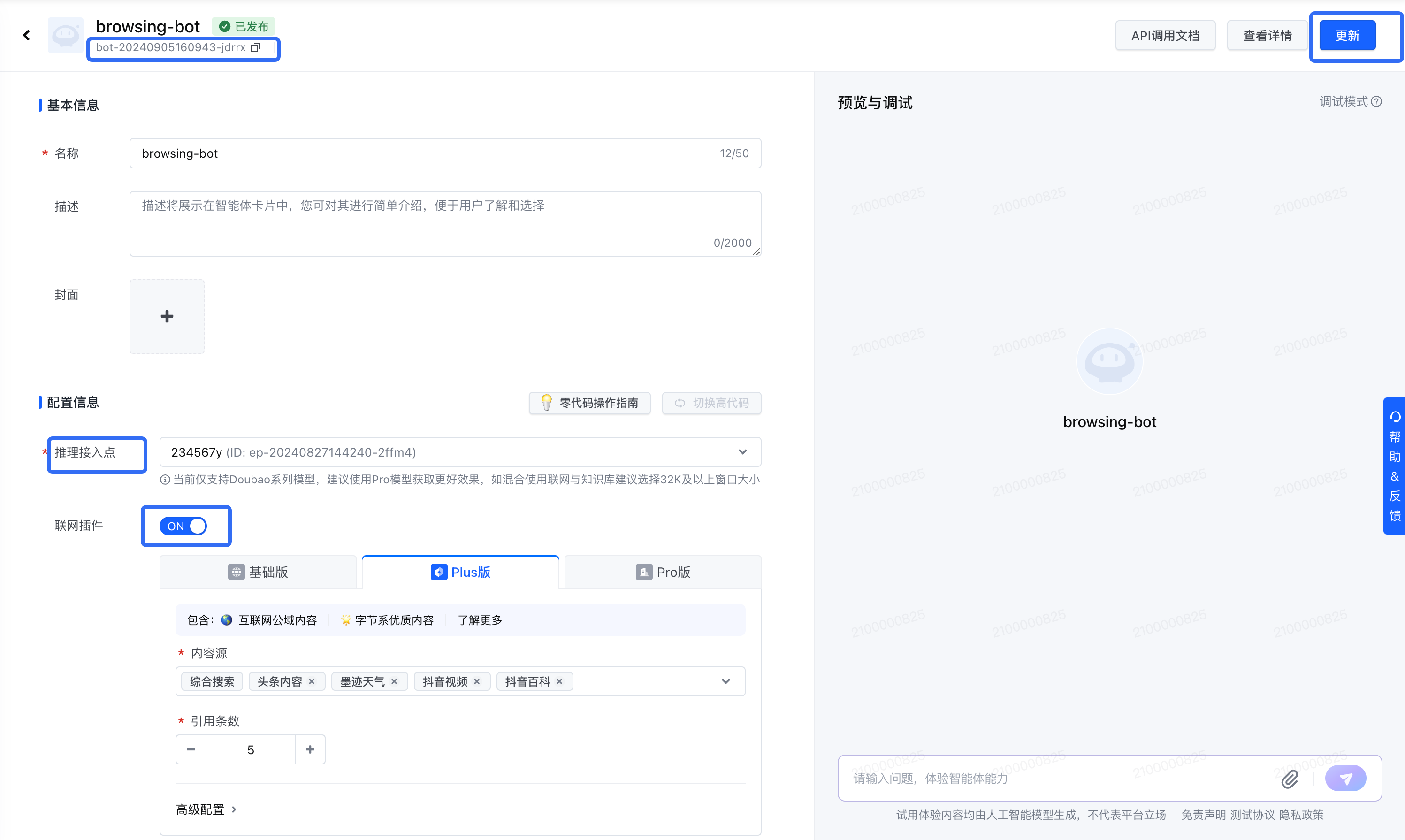
智能体中心>创建智能体>零代码>单聊>创建详情页
import os
from volcenginesdkarkruntime import Ark
client = Ark(
api_key=os.environ.get("ARK_API_KEY"), # 这里同时支持通过 api_key 构造和通过 aksk 构造,二者选其一即可
base_url="https://ark.cn-beijing.volces.com/api/v3"
)
completion = client.bot_chat.completions.create(
model="bot-xxxxxx-yyy",
messages = [
{"role": "user", "content": "hello"},
],
)
print(completion)
V3 API 的详细说明参见 API 列表,V3 SDK 的详细说明参见 SDK 调用指南。如有其他迁移问题,可以通过 提交工单 的方式,进行咨询。
本期下线说明#
本期下线时间说明#
| 通知时间 | 下线时间 | 影响说明 |
|---|---|---|
| 2024年10月16日 | 2024年11月30日 | SDK下线工作将于通知时间起进行,自通知时间开始,将逐步下调SDK V1/V2配额; 至下线时间日,SDK V1/V2 正式下线并停止服务;建议尽快切换至SDK V3 |